
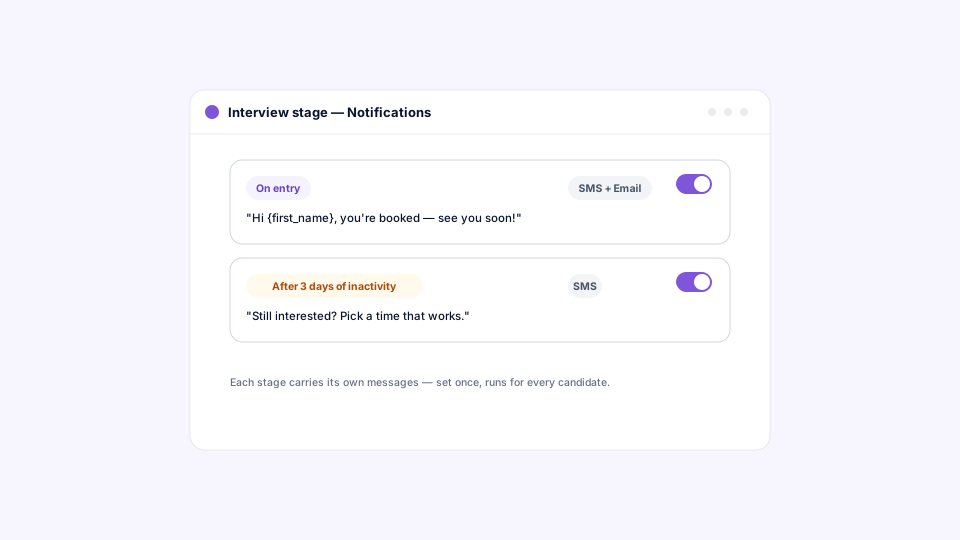
HappyFleet’s automated notifications stop candidates from going dark by having your Applicant Tracking System (ATS) send an SMS or email at the two moments that matter: when a candidate enters a new stage, so they know where they stand and what’s next, and after a period of inactivity, so nobody sits silently in a stage until they give up. In HappyFleet, every stage in a pipeline can carry its own notifications, personalized automatically with the candidate’s name, the job, the company, and the stage, and the same setup works across every stage type, from a custom stage to an AI Phone Screen, a Questionnaire, or a Scheduling stage. Silence is the number one reason frontline candidates drop out of a hiring process; stage notifications make silence impossible by design.
Why do candidates go dark, and what does a notification change?
Candidates go dark because they don’t know what’s happening. They applied, heard nothing, assumed the answer was no, and took the next job that responded. A notification replaces that assumption with a fact: you’ve moved forward, here’s what’s next, here’s the link.
Frontline candidates are usually running several applications in parallel, from a phone, between shifts. The employer that tells them where they stand keeps them; the employer that leaves them guessing loses them, often without ever knowing they were interested. Consistent, stage-by-stage updates are one of the biggest drivers of candidate retention through a process, a point developed in how an ATS handles candidate communication and interview scheduling. What HappyFleet adds is that those updates aren’t a task on anyone’s list. They’re tied to the stage, so they happen every time, for every candidate, at every location.
What triggers a notification?
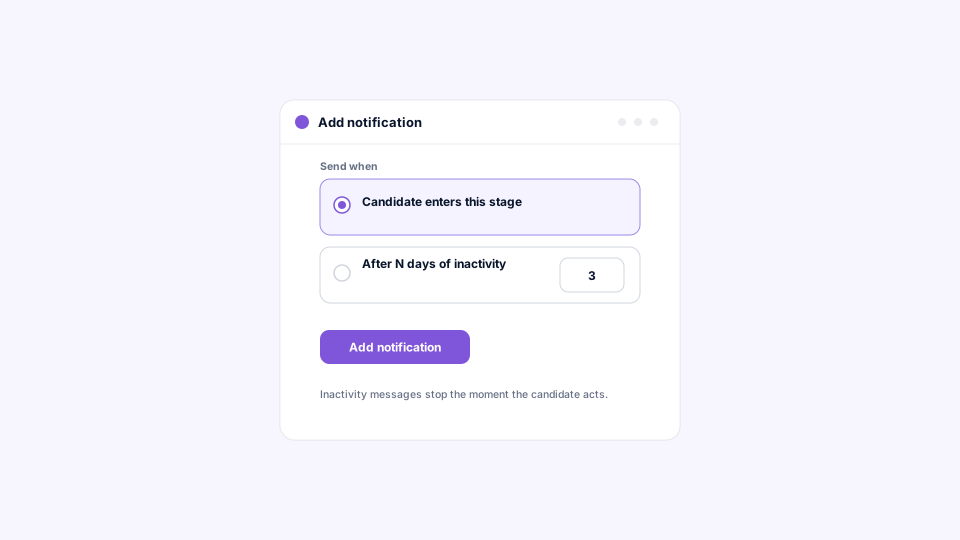
Two triggers cover the pipeline: when a candidate enters a stage, sent the moment they move in, and after a number of days of inactivity you choose, sent once a candidate has been idle in the stage that long. Together they handle both “here’s your next step” and “you haven’t taken it yet.”
The entry trigger is the workhorse. A candidate advancing into a Questionnaire stage gets a message asking them to complete the form; one entering a Scheduling stage is invited to book; one reaching a Signature / Form Fill stage learns their offer is ready to sign, with a direct link. The inactivity trigger is the safety net, catching the candidate who meant to book but forgot and the one whose text got buried. It fires once, a friendly nudge rather than a drip campaign. Because both triggers are configured per stage, you can be prompt where speed matters, such as a quick reminder to book an interview, and patient where it doesn’t.
Which channels can a notification use?
Every stage supports SMS and email, and each notification can use either or both. For hourly and frontline candidates, who apply from a phone and check email rarely, SMS is usually the channel that gets read; email is the channel that carries detail and can be found later.
Using both together is common: a short text that says “your offer is ready, tap here” and an email with the same link and a fuller explanation. The point is to meet candidates where they already are rather than where your team happens to be, which is a core theme of AI recruiting for frontline and hourly workforces. Whatever the channel, the message is sent by the platform and tied to the stage, not sent from a recruiter’s phone and forgotten.
How do merge tags personalize messages at scale?
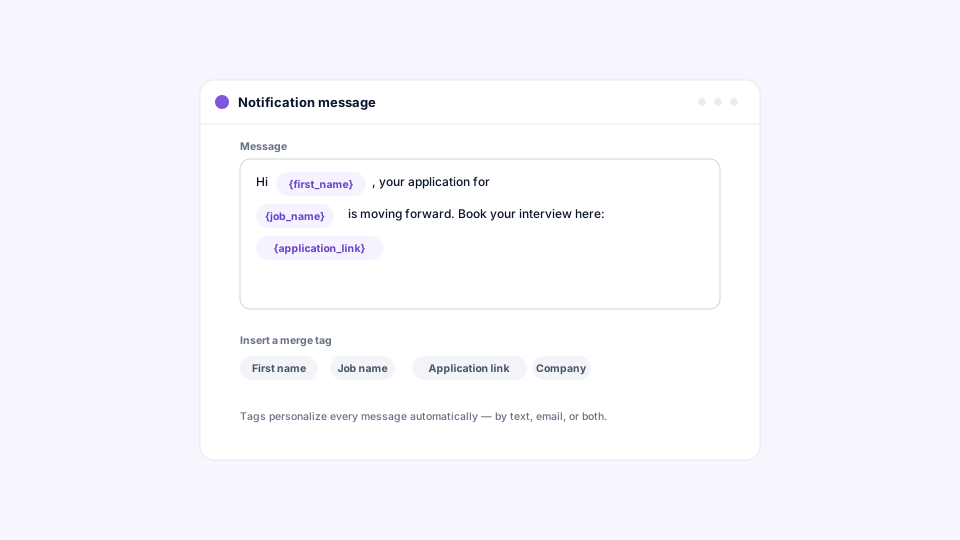
Merge tags fill candidate- and job-specific details into a message automatically, so one template reads as a personal note to every recipient. Messages can pull in the candidate’s name, the job, the company, the stage, and a direct link into the candidate’s portal.
A message like “Hi {Candidate first name}, you’ve moved forward in the {Job name} process” becomes “Hi Maria, you’ve moved forward in the Delivery Associate process” for one candidate and “Hi Devon, you’ve moved forward in the Warehouse Lead process” for the next. That’s the balance large employers need: templates for consistency across hundreds of requisitions and dozens of sites, personalization so candidates feel addressed rather than processed. It also lets a central team write the messaging once and have every location inherit it, keeping tone and compliance language uniform in a way individual managers texting from their own phones never could, which ties into how an ATS manages hiring across multiple locations, brands, or business units.
Do notifications work the same way on every stage type?
Yes. Custom stages, AI Phone Screen, Questionnaire, Scheduling, and Signature / Form Fill stages all use the same notification setup, configured on the individual stage. Learn it once and it applies everywhere in the pipeline.
That uniformity is a practical advantage for teams building workflows across many jobs. There’s no separate messaging tool to configure for interviews versus paperwork, and no gap where one stage type can’t notify. It also makes the pipeline’s messaging easy to audit: open any stage, and its notifications are right there. For a walkthrough of what each stage does and where notifications fit, see the articles on the AI Phone Screen stage, the Questionnaire stage, the Scheduling stage, and the Signature / Form Fill stage.
How are stage notifications different from meeting reminders and chat nudges?
Stage notifications are about pipeline position: they fire on entry and on inactivity. Meeting reminders, configured on a Scheduling stage, are tied to a specific booked meeting and timed before the appointment. Chat nudges tell a candidate that a teammate sent them a message they haven’t read.
The three layers work together without overlapping. A candidate enters a Scheduling stage and gets an entry notification inviting them to book. They book, and the meeting’s own reminders take over, by email, SMS, or both, at the times you set. If a recruiter sends them a question in chat that they don’t open, a chat nudge follows. Each message has a reason, so candidates never get a generic ping they can safely ignore, which is what keeps them opening the next one.
What do consistent notifications do for a large organization?
They make candidate communication a property of the pipeline rather than a property of the people running it. Every site, every recruiter, every requisition sends the same messages at the same moments, and hiring leaders can trust that no candidate is waiting in silence anywhere in the organization.
That reliability is what busy multi-site teams can’t achieve by hand, and it shows up in outcomes. LaRae, an HR administrator at Express Package, an Amazon Delivery Service Partner, saw candidate engagement rise from around 30 percent to 80 percent and the time from application to onboarding drop from roughly seven days to two after moving to HappyFleet, as documented in her case study. Rafael Garcia, who built Gallo Logistics into a 35-route Amazon Delivery Service Partner operation in Florida, saw his second-round interview show rate rise from roughly 10 to 15 percent to 76 percent after automating screening and follow-up, as described in his case study. Automated, well-timed communication is a big part of both stories.
Where do legacy ATS notifications fall short?
Legacy ATS notifications tend to be email-only, sent from a system address candidates ignore, and limited to a handful of fixed events. Inactivity is rarely a trigger at all, which means the candidate who stalls is exactly the candidate who never hears anything.
The bigger limitation is architectural. When texting, scheduling, and screening are separate tools bolted onto a database, notifications can’t reflect what’s actually happening across them; a message might tell a candidate to book an interview that a different tool already scheduled. When every stage is part of one connected pipeline, each notification knows precisely where the candidate is and what they need to do, and the analytics that hiring leaders rely on can show response times and drop-off by stage. That connected model is the subject of what is an AI ATS?
Every candidate, told where they stand, every time
HappyFleet is one platform with two connected AI products: the AI Recruiter, which conducts automated phone-screening interviews with every applicant in more than 10 languages, 24 hours a day, and produces a scored summary of fit and eligibility, and the AI ATS, which chats with candidates over text, books interviews through its own built-in scheduler, and captures candidate data automatically at every pipeline stage. Stage notifications are the connective tissue between those steps, keeping candidates moving from screen to interview to signed offer without a recruiter drafting a single message. For large organizations hiring frontline teams across many locations, that’s how a pipeline stays full at the end, not just at the start.